Technology Desc

Why Post Orders Matter More Than You Think

Courtney Sparkman, OfficerApps, CALSAGA Associate Member

Most security problems do not begin with bad intentions. They begin with unclear direction from managers and supervisors.

In the security industry, post orders are often treated as a formality. Something written once, handed to an officer, and rarely revisited unless something goes wrong. Yet, post orders quietly define how a security officer’s authority is exercised, how judgment is applied, and how a security company presents itself to the clients it is supposed to protect.

A story from hospital security shows exactly what happens when post orders exist without a process behind them.

When Following Post Orders Becomes the Problem

A security officer working armed security at a large hospital was assigned to the main entrance. This was a busy trauma center in a rou\gh part of town where real security issues were constant and ongoing. There were mental health patients fighting in the ER. Strange people wandering into restricted areas. Vulnerable patients getting lost. All situations that required a security officer with presence, discretion, and sound judgment.

Then a new instruction came down. The officer was told to post up at the main entrance to keep hospital staff out. Not because of a threat or an operational risk, but because someone in middle management decided employees should use a different door to keep the entrance clear for patients and guests.

Doctors, nurses, facilities staff, and janitorial teams were redirected. Anyone who refused would have their name recorded for reprimand. The instruction made little sense to the officer because it pulled attention away from real risks and replaced it with administrative enforcement that added no security value. But the post orders were clear enough. This was now his post.

When Post Orders Collide With Reality

One day, a man in a suit approached the entrance leading a group of well-dressed executives. All wore employee badges. The man at the front, from his stature, was clearly important.

Following his post orders, the officer stopped the group and redirected them to the West entrance. When the man insisted on using the main entrance, the officer calmly explained the policy and informed him that names would be taken and supervisors notified. So he did exactly that. Every name. Slowly. Carefully.

When the security supervisor reviewed the list, one name stood out immediately. It was the name of the Chief Executive Officer.

The well-dressed man that the security officer stopped was the CEO of the entire health system who was escorting potential investors around the hospital. The CEO had never been informed of the policy change.

As you can guess, the policy was quietly reversed, and staff were once again allowed to use the main entrance.

Common sense eventually won. But only after wasted time, unnecessary friction, and reputational risk.

What This Story Is Really About

This is not a story about a bad officer. He did exactly what he was told. It is not even a story about a bad policy; poor policies exist in every organization. What it is, is a story about post orders created without a process.

Post orders do more than tell officers what to do. They determine whether officers are empowered to apply judgment or forced to enforce instructions that were never tested against reality. When post orders are written without a full understanding of the environment, officers are left choosing between common sense and compliance.

In this case, compliance exposed the weakness in the system.

Why Post Orders Require Discipline, Not Just Documentation

Effective post orders do not begin with the purpose of accomplishing some goal.

Every instruction in the post order should tie back to a clear security or operational objective. If an order cannot be explained in terms of risk reduction, safety, or operational control, it does not belong in the post orders. Administrative convenience and internal politics should never be enforced by front line security…although it happens more than enough.

Post orders also require validation before deployment. Any instruction that affects access, movement, or behavior within a facility must be reviewed with the stakeholders that ultimately owns the space. In the hospital example, the CEO was unaware of a policy that directly affected how his organization operated. That gap alone guaranteed failure.

Officers must also be part of the process. Experienced officers know immediately when an instruction will create distraction, conflict, or confusion. When there is no mechanism for that feedback to move upward, flawed post orders survive longer than they should.

Finally, post orders must be treated as living documents. Even well-intentioned instructions can deteriorate over time. This usually happens when client expectations change, threat profiles evolve, or most commonly when leadership turns over. Rules that once made sense quietly become liabilities when not revisited.

By scheduling regular reviews of your post orders, security organizations can address any necessary questions before embarrassment or incidents happen. Without regular reviews officers may bend a rule to do their job when the rule is the problem.

The Real Value of Getting Post Orders Right

When a disciplined process exists, post orders support and officer’s judgment instead of replacing it. As a result officers are not forced into robotic enforcement which leads to supervisors spending less time managing fallout and ensuring client satisfaction.

Post orders are not just miscellaneous paperwork, they are operational intent made visible. When they are wrong, everyone feels it. Sometimes at the front door, in front of investors, with a CEO holding his badge in the air.

Either way, the lesson is the same, post orders matter.

Courtney W. Sparkman is the founder and CEO of OfficerApps, the umbrella technology platform behind OfficerReports, OfficerHR, and OfficerBilling, a suite of purpose built tools designed exclusively for security guard companies. With more than two decades of hands on experience in security operations, sales, and executive leadership, Courtney brings deep industry knowledge paired with a practical, operator first approach to technology and growth.

Prior to founding OfficerApps, Courtney held senior leadership roles across the security industry. He had most recently served as Director of Business Development for Diamond Detective Services, where he led national growth initiatives, pursued public and private sector opportunities, and consistently won competitive bids through strategic prospecting, client presentations, and proposal driven sales.

Earlier in his career, Courtney served as Vice President of Operations and Sales at Cequr Security, a security guard company he co-founded with his father. During his seven-year tenure, he was directly responsible for client acquisition and retention, developing training standards, and implementing quality assurance initiatives. The operational challenges and lessons from that experience directly inspired the creation of the OfficerApps platform.

In addition to leading OfficerApps, Courtney is the publisher of Security Guard Services Magazine. The only magazine dedicated to the security guard services industry where he covers industry leadership, technology, and the future of manned guarding. He is also a speaker and author, frequently sharing insights on how security companies can modernize operations, scale profitably, and remain competitive in a rapidly evolving marketplace.

Courtney previously held a private security contractor license in the state of Illinois, earned through a rigorous background check and licensing examination. He holds a Bachelor of Science in Agricultural Economics from the University of Illinois at Urbana Champaign and is currently a candidate for a Master of Science in Emergency Management from the University of Chicago.

Improve Shift Management Operations with a Unified Approach

Gurmit Dhaliwal, Celayix, CALSAGA Associate Member

Security operations are becoming more complex, but the systems used to manage them haven’t kept pace.

Hiring, shift scheduling, time tracking, payroll, and billing are often handled in disconnected tools. Even so-called “all-in-one” platforms struggle to meet the needs of sophisticated security organizations, where requirements evolve constantly, and operational precision is non-negotiable.

Legacy software and broken workflows lead to miscommunication, staffing gaps, compliance risk, and lost revenue. As complexity increases, these failures become harder and more expensive to manage.

When Communication Breaks Down, Operations Suffer

For security operations to run smoothly, accurate data and timely communication must flow across every system.

New guards must be onboarded correctly and made available for shifts without delay. Scheduling must account for qualifications, availability, and location requirements to ensure the right guard is deployed at the right time. Shifts must be communicated clearly and accepted quickly, with transparency that reinforces fairness and trust.

When communication fails, the impact is immediate: no-shows, frustrated employees, higher turnover, and missed revenue. Inaccurate or delayed time and attendance data creates downstream payroll and billing issues, leading to reconciliation headaches, payment disputes, and compliance risks.

Small data failures quickly become operational chaos.

Why All-in-One Software Falls Short

Every function within a security operation has unique requirements.

HR teams need flexible hiring workflows. Schedulers need real-time visibility and intelligent tools to deploy the best available guard across multiple job sites. Finance teams require precise, compliant data flow between time tracking, payroll, and billing.

All-in-one systems promise simplicity but sacrifice depth. They are built for the average use case, not the operational realities of complex, growing security organizations. As a result, businesses outgrow them quickly—or never fully realize their potential.

Sophisticated operations require flexibility, specialization, and control.

The Power—and Challenge—of Best-of-Breed Solutions

Best-of-breed platforms excel by focusing deeply on a single domain. They deliver advanced functionality, industry expertise, and continuous innovation that generic systems can’t match.

The challenge has always been integration. Connecting specialized systems traditionally required custom development, ongoing maintenance, and internal technical resources that many organizations don’t have.

As a result, many security firms settle for suboptimal systems—not because they want to, but because integration felt too complex.

The Evolution to a Unified, Integrated Approach

That trade-off no longer exists.

Modern APIs and native, pre-built integrations now enable specialized platforms to work together as a cohesive system. Instead of stitching tools together manually, forward-thinking vendors are partnering to deliver seamless, production-ready integrations out of the box.

This unified approach allows each system to operate at its full strength while data flows automatically across the organization, from hiring to scheduling to payroll and billing.

The result:

  • Fewer errors and less manual work
  • Faster, more reliable staffing decisions
  • Better employee communication and engagement
  • Improved billable utilization and lower administrative costs
  • Built-in compliance that adapts as requirements change

Better data flow enables smarter automation and clearer analytics, providing visibility into true shift costs and operational efficiency. Organizations gain the agility to adapt quickly, whether responding to client demands, workforce changes, or growth opportunities.

A Unified Workforce Without Compromise

Native, intelligent integrations create a unified workforce management ecosystem without sacrificing flexibility or control. Security organizations can mix and match best-of-breed tools while operating as a single, cohesive system.

The outcome is clear: fewer bottlenecks, less chaos, and a foundation built for scale.

As one Project Manager at Cerberus Security Group put it:

“The proof is in the pudding. Celayix and isolved have solved a lot of things overnight. The training was really amazing. It’s sophisticated software, but not complicated at all from a user standpoint.”

For security organizations ready to move beyond fragmented systems and outdated workflows, a unified approach delivers what all-in-one solutions never could: clarity, control, and confidence at scale.

For a real-world example, see the recent announcement on Celayix and isolved partnering to deliver unified workforce management for the security industry.

Gurmit Dhaliwal is the CEO of Celayix, which delivers shift management for workforce operations and helps ensure every shift is covered. His 25 years of experience in employee scheduling and time-and-attendance software help improve shift management for the security guard industry. He understands the complex requirements of the industry, such as compliance with California State Laws and integrating best-of-breed tools to simplify workflows and accelerate operations.

Guard Tour Best Practices for Crowded Venues (Stadiums, Malls, Events)

Jordan Wallach, Belfry, CALSAGA Network Partner

Managing security in a crowded venue, whether it’s a stadium on game day, a mall during holiday promotions, or a large public event, requires precision, structure, and constant situational awareness. As a supervisor or operations manager, you already know how quickly a routine patrol can turn into a high-pressure incident when tens of thousands of people are moving through your facility.

Crowded venues present unique challenges: blind spots created by dense foot traffic, delayed reporting caused by noise or congestion, missed patrols during peak hours, and slower incident response time when guards can’t move freely. These pressures make it difficult for any team to maintain consistent coverage without a well-designed system.

This is where security patrol best practices become essential. By combining structured patrol planning with modern tools like GPS guard tracking, NFC checkpoints, and intelligent reporting, you can dramatically improve coverage, accountability, and response times, especially during high-traffic seasons like November and December.

Why Guard Tour Structure Matters

A well-structured guard tour isn’t just about walking predictable routes; it’s about ensuring every zone receives the right level of attention at the right time.

What is a Guard Tour System?

A guard tour system is a framework that uses pre-defined routes, checkpoints, and tracking tools (such as QR/NFC tags or GPS) to ensure officers complete their assigned patrols. It enhances situational awareness, supports incident documentation, and helps supervisors verify that coverage requirements are being met.

For large venues, the right guard tour best practices reduce:

  • Security blind spots
  • Missed incidents
  • Delayed responses
  • Unauthorized access
  • Incomplete patrols

When your guards follow structured and trackable patrol cycles, your entire operation becomes more proactive rather than reactive.

Designing Patrol Routes for Maximum Coverage

Crowded venues require intelligent planning to keep patrols efficient and unpredictable. You, your team, and your contracted guards must collaborate to design patrol routes that security teams can follow consistently.

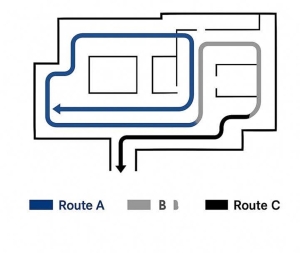
1. Use A/B/C Route Rotations

Rotating through three defined routes prevents predictable patrol patterns that bad actors can exploit.

  • Route A: Main concourses, entrances, service corridors
  • Route B: Upper levels, escalators, stairwells, back-of-house areas
  • Route C: Parking structures, exterior walkways, drop-off points

Each shift should rotate routes so guards don’t follow the same pattern daily.

2. Alternate Entry & Exit Points

This reduces the risk of blind spots and helps officers detect repeat suspicious behaviors.

3. Sample Patrol Route Diagram (Conceptual)

Use a full diagram in your operations manual so guards can visualize each route clearly.

4. Consider Timing & Foot Traffic

During the holidays or peak events, routes should be adjusted to reflect:

  • Expected crowd surges
  • Event schedules
  • Vendor/contractor movements
  • VIP pathways

This ensures your security patrol best practices remain aligned with real-world conditions.

Using GPS and QR/NFC Checkpoints to Improve Accountability

Modern patrol management relies heavily on technology. Tools like GPS guard tracking and NFC or QR checkpoints ensure guards complete tours on time and at the correct locations.

How Checkpoint Systems Work

  • You place QR/NFC tags at critical zones
  • Guards scan checkpoints using the mobile app.
  • GPS adds an extra layer of verification.
  • Supervisors get real-time activity logs.

Timing Matrix for Patrol Efficiency

Route Expected Duration Tolerance Flag Condition
A 22–26 minutes ± 4 mins > 30 mins or < 18 mins
B 28–33 minutes ± 5 mins > 38 mins or < 23 mins
C 18–22 minutes ± 3 mins > 25 mins or < 15 mins

This matrix helps supervisors assess patrol quality and detect:

  • Rushed or incomplete routes
  • Extended stops
  • Deviations that may require follow-up

How GPS Improves Response Times

Real-time alerts notify supervisors when:

  • A guard goes off-route
  • A checkpoint is missed
  • A panic alert is activated
  • Foot traffic blocks a standard route

Faster visibility = faster incident response time.

KPIs Every Security Supervisor Should Track

To improve guard performance and venue safety, track KPIs that reflect actual patrol effectiveness:

1. Patrol Completion Rate (%)

Measures how many scheduled patrols were completed vs. assigned.

2. Missed Checkpoint Ratio

Scheduling and callout procedures must adhere to regional labor laws governing rest periods, on-call pay, maximum work hours, and mandatory overtime policies. For U.S. companies, refer to the U.S. Department of Labor (DOL) guidelines and your state’s labor board for compliance requirements. This content is for informational purposes only and not legal advice.

3. Average Incident Response Time

Evaluates how quickly guards react to alarms or alerts (a critical metric during crowded events).

4. Guard Punctuality

Late shift starts cause delayed patrol cycles and increased risk.

These KPIs become even more valuable when integrated into security operations management software or security workforce management software that automatically logs and visualizes performance.

Technology Tools That Streamline Patrol Management

This is where advanced solutions like security guard software make a dramatic difference.

Guard Patrol Management Software helps you:

  • Track guard locations in real time with GPS guard tracking
  • Automate checkpoint scans using NFC or QR tags
  • Receive alerts for missed checkpoints or deviations
  • Analyze patrol activity with automated dashboards
  • Maintain shift visibility across crowded venues
  • Integrate patrol data with incident reporting and scheduling

When combined with the right scheduling tools, supervisors can create:

  • Holiday-ready patrol plans
  • Backup shift assignments
  • Callout playbooks for no-shows
  • Rapid-response staffing workflows

Quick Checklist: Guard Tour Optimization

Use this checklist before your next large event or holiday rush:

  • Alternate A/B/C routes each shift
  • Verify checkpoints daily via GPS/NFC
  • Track completion rates weekly
  • Update escalation SOPs before peak events
  • Use automated reporting tools for visibility
  • Provide guards with active communication channels
  • Maintain backup officer lists for callouts
  • Review incident trends before designing new routes

Legal Disclaimer:

Guard tour planning and scheduling must comply with local labor laws covering overtime, rest periods, and maximum allowable shift lengths. Refer to the U.S. Department of Labor and your regional labor board for formal guidelines. This article is informational only and does not constitute legal advice.

Optimize Your Patrol Strategy

Crowded venues demand structured patrols, real-time visibility, and technology that keeps guards accountable. With the right guard patrol management software and the right playbook, you can increase coverage, strengthen response times, and protect every corner of your venue.

Jordan Wallach is the Co-Founder and CEO of Belfry, a software platform built for security guard services companies to manage scheduling, payroll, compliance, and field operations with greater visibility and less operational friction.

Jordan founded Belfry after spending hundreds of hours speaking directly with security company owners, operations managers, and officers across the country. Those conversations shaped Belfry’s focus on reducing back-office burden and supporting the realities of running a distributed, people-intensive operation.

Prior to Belfry, Jordan worked in product and software roles at Microsoft and as an Engagement Manager at McKinsey & Company, advising technology companies on product strategy and growth. He holds a B.S. in Mathematical and Computational Science from Stanford University and is based in New York City.

Inside the Frontline: An Industry Snapshot

Johann Hauswald, PlixAI, CALSAGA Network Partner

The Gap Between Perceived Risk and Operational Reality

Most industry strategies for frontline safety are built on a worst-case foundation: training for rare assaults, staffing for static shifts, and documenting only major incidents. While well?intentioned, this approach leaves organizations prepared for the exception rather than the rule.

An analysis of more than 10,000 incidents across three major U.S. metropolitan areas, captured through AI?powered body?worn cameras, reveals a different operational reality. Risk is not occasional or isolated – it is continuous, routine, and largely invisible to leadership relying on traditional reporting methods.

This snapshot moves beyond anecdote to provide a data?driven view of frontline operations, uncovering a critical visibility gap between what leadership believes is happening and what frontline teams actually experience each day.

Key Findings

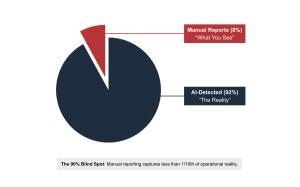
  • The 90% Blind Spot: Organizations that rely on manual incident reporting are effectively blind to over 90% of frontline risk signals. While traditional reports capture roughly 8% of activity, automated AI detection shows that operational friction is ongoing, not episodic.
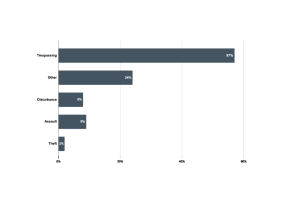
  • The 80/20 Workload Reality: Frontline teams are not primarily responding to high?severity crime. 83% of daily activity involves routine compliance issues such as trespassing, access disputes, and refusal to comply, while only 17% of incidents escalate into high?severity events.
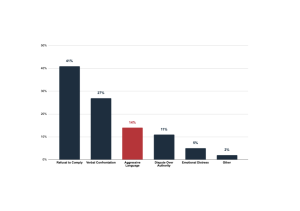
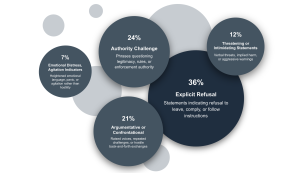
  • Escalation is Conversational: Violence is rarely spontaneous. Nearly 70% of escalations begin with verbal resistance or authority challenges, creating a measurable pre?escalation window that often goes unaddressed.

THE VISIBILITY GAP: THE 90% BLIND SPOT

Incident detection follows two primary paths: manual reporting and automated, always?on detection. The data shows that manual reporting captures only a small fraction of real?world interactions.

Key Insight

Organizations relying solely on manual reports operate with a 92% visibility gap. Frontline risk is continuous, but legacy reporting tools capture only isolated moments, leaving leadership unaware of the true volume of operational friction.

Operational Takeaway

You cannot manage risk you do not see. Closing the visibility gap requires moving from after?the?fact reporting to continuous workforce intelligence.

THE 80/20 REALITY: FREQUENCY VS SEVERITY

Incident Breakdown

The data reveals that routine compliance issues such as trespassing, loitering, and access disputes account for the majority of frontline activity, while high?severity incidents remain statistically rare.

Operational Takeaway

Operational efficiency is gained by optimizing for the 80% of interactions that occur daily, not just the extremes. Systems and training must support flexibility, communication, and de?escalation as core competencies.

THE ANATOMY OF ESCALATION: LANGUAGE AS AN EARLY WARNING SYSTEM

Behavioral Triggers Across 10,000 incidents

Analysis across thousands of incidents shows that physical aggression is rarely the starting point:

Linguistic Signals

Instead, non?violent verbal cues – resistance, challenges to authority, and refusal to comply – trigger more than 60% of automated alerts.

Key Insight

Escalation is primarily a conversational breakdown, not a spontaneous physical event. Since nearly 70% of escalations stem from non-compliance and verbal disputes, there is almost always a “pre-escalation window” – a clear period of verbal resistance that occurs well before any physical risk materializes.

Operational Takeaway

Treat language as the earliest indicator of risk. Since verbal resistance reliably precedes physical violence, safety strategies should focus on early intervention. Training staff to recognize and de?escalate specific verbal patterns can prevent many of the incidents that later become severe.

OPTIMIZING COVERAGE: ALLOCATING RESOURCES TO PEAK RISK

Daily & Weekly Patterns

Incident volume does not follow a simple day?versus?night pattern. Instead, activity forms a double?peak curve, clustering around late morning (~11:00 AM) and late evening (~11:00 PM). Volume steadily builds throughout the week, peaking on Fridays, when incidents start earlier and persist later than on other weekdays.

Key Insight

Operational risk aligns with social and business cycles, not just darkness. The late-morning spike suggests friction related to business operations and access, while the Friday surge reflects social movement. Crucially, Friday risk is longer, not just higher meaning standard 8-hour shift blocks often leave the “shoulders” of this high-risk window exposed.

Operational Takeaway

Staff for the curve, not the clock. Static shifts often overserve low?risk early?morning hours while underserving critical peak periods. Effective workforce management requires dynamic scheduling that specifically targets the 11:00 AM / 11:00 PM intensity clusters and extends coverage windows for the weekend ramp-up.

CONCLUSION: FROM ACTIVITY TO INSIGHT

The Reality

A full-distribution view of frontline activity reveals a reality that traditional “top incident” summaries miss. The data proves that risk is continuous, not episodic. Escalation is predictable and conversational, not spontaneous. And crucially, the operational load is driven by volume, not rarity.

The Strategic Shift

Organizations can no longer afford to operate based on the small percentage of incidents that get manually reported. Effective risk management requires visibility across the entire interaction lifecycle – from the first verbal refusal to the final report.

Final Takeaway

Moving from reactive reporting to proactive workforce intelligence enables three immediate advantages:

  1. Smarter Staffing: Align coverage with real 11:00 AM / 11:00 PM risk curves.
  2. Effective Training: Focus on the language and behaviors that precede 70% of escalations.
  3. Defensible ROI: Base staffing, technology, and budget decisions on real operational behavior, not worst-case hypotheticals.

For private security organizations, visibility is no longer a nice to have. It is the foundation of safer teams, stronger operations, and sustainable growth.

Johann Hauswald is the Founder and CEO of Plix AI, a startup developing AI-enabled body cameras and safety analytics software for private security and field-operations industries. Plix is backed by Sequoia Capital, Andreessen Horowitz (a16z), and the founders of Samsara and Verkada.

Johann earned his Ph.D. in Computer Engineering from the University of Michigan, where he specialized in AI at the edge and computer vision. Before founding Plix, he was a postdoc at Stanford working on large-scale video analytics and edge inference systems and previously co-founded a venture back AI company building conversational AI systems. His work sits at the intersection of AI, safety, and real-time video intelligence, advancing how organizations detect and respond to incidents in the physical world.

The True Cost of Inaccurate Timekeeping (and How to Fix It)

Stephanie Petersen, TEAM Software by WorkWave, CALSAGA Network Partner

If you manage a security guarding company, you know the reality of a distributed workforce: your business happens everywhere but your office. Your teams are out in the field, often working independently at multiple high-stakes job sites. While that flexibility is inherent in the industry, it creates a massive data blind spot if you aren’t careful.

When you can’t see your employees, how do you know — really know — that your timekeeping is accurate?

For many in the security industry, “close enough” has been the standard for too long. But in a world of razor-thin margins and strict compliance regulations, “close enough” is a leak your business can’t afford. Accurate timekeeping is the foundation of your profitability, your compliance strategy and your employee retention.

1. Protecting Your Profit Margins

Labor is almost certainly your largest expense. When timekeeping records are loose, you are likely overpaying for labor without realizing it. Even minor discrepancies — a few minutes here, a rounded-up hour there — compound quickly across hundreds of guards and job sites.

Beyond simple overpayment, accuracy is critical for job costing. You need to know precisely how many hours are spent on specific sites to understand if a contract is actually profitable. Accurate timekeeping ensures you are billing clients for every minute of service delivered, preventing the “missed minutes” that silently eat away at revenue.

2. The Shield of Compliance

Labor laws are unforgiving. You need auditable, precise documentation of hours worked, breaks taken and overtime accrued. If you are relying on manual timesheets, you are leaving yourself open to audits, fines, and legal disputes.

For security contractors, timekeeping serves as a digital audit trail. It provides proof of presence, verifying a guard was at a specific post at a specific time, which significantly reduces your liability if a security incident occurs.

3. Proof of Service Is Your Promise

Your customers want to know they are getting the protection they paid for. Was the lobby guard at their post at 8:00 AM?

Accurate timekeeping acts as proof of service. When you can provide verified data that correlates time punches with GPS or location markers, you give your customers confidence. This visibility protects your reputation and helps you retain contracts in a competitive market.

4. Building Trust with Your Team

Reliable timekeeping ensures fair compensation for every hour worked, which is critical for retention in an industry with high turnover. Furthermore, accurate data helps you avoid burnout. By analyzing true hours worked, you can adjust schedules to prevent employees from overextending themselves.

The Solution: WinTeam Mobile

Capturing data in the field is difficult. Connectivity issues and the risk of “buddy punching” have historically made accuracy a challenge. That is why we are rolling out significant updates to WinTeam Mobile to close the gaps between your field operations and your back office.

  • Offline Punch Capabilities: Capture punch data and GPS locations even without cellular connectivity. The app automatically synchronizes and validates the data once service returns.
  • Kiosk Mode: For sites with large teams, the new multi-user kiosk mode allows rapid clock-ins for multiple workers using a single device. This eliminates the need for expensive, specialized hardware.
  • Biometric Validation: Coming soon, WinTeam Mobile will include optional facial verification. This feature virtually eliminates time theft and buddy punching by confirming the right employee is at the right place at the right time.

Accurate timekeeping is the difference between guessing at your success and engineering it. With TEAM Software by WorkWave, you have the tools to turn time tracking into a competitive advantage.

Ready to see how WinTeam can tighten your operations? Visit TEAM Software online at teamsoftware.com to request a demo today.

Stephanie is a passionate product manager with over a decade of experience shipping complex software. She specializes in owning ERP products for security and janitorial operations, turning chaotic workflows into functional systems designed to perform in the field and deliver measurable impact.

Why Your AI Is Only as Good as Your Data Factory: The Hidden Requirement for Security Operations

David Libesman, TEAM Software by WorkWave, CALSAGA Network Partner

AI is the current buzzword in the security industry. From automated scheduling and predictive guard patrolling to agentic workflows that can flag incidents on their own, the promises are significant. Vendors suggest smarter dispatching, reduced overhead and better client experiences with minimal effort.

However, there is a reality the industry often ignores: AI without a Data Factory is just an expensive experiment.

If your data is fragmented or inconsistent across systems, no AI model will ever deliver the results you expect. In the security industry — where operations change minute-to-minute at different posts — that gap is dangerous. The faster your business moves, the more damage bad or delayed data can do.

The Reality: Why Security AI Fails

Many security companies rush to adopt AI but overlook the foundational layer required to fuel it: a Data Factory that continuously cleans, unifies, and prepares datasets for real-time decision-making.

Common issues security pros encounter include:

  • Data Silos: Guard notes are in one system, billing in another and scheduling in a third. AI cannot reconcile these conflicting sources.
  • Manual Latency: Relying on manual uploads or human-initiated exports leads to multi-day delays that break real-time automation.
  • Dirty Data: Inconsistent job types or incorrect site IDs from the field cause predictive models to degrade quickly.

Trying to run AI on poor data is like trying to navigate an autonomous vehicle down a road of potholes and missing road signs. The technology is advanced, but the environment makes it worthless.

What a Data Factory Actually Does

A true Data Factory is not just a database or a dashboard. It is a live operational layer that:

  1. Automates Ingestion: It pulls every data point across your operations, including payroll, scheduling, and field notes.
  2. Normalizes Records: It ensures that an “incident” or “checkpoint” means the same thing across different regions and supervisors.
  3. Eliminates Human Dependency: It removes the need for manual spreadsheet merging or data extracts.
  4. Streams in Real Time: It ensures data is current so AI agents can act immediately.

Why Security Needs Real-Time Data

Security is a data-volatile industry. Your guards are constantly updating statuses and capturing photos through mobile tools. AI agents built on stale data make the wrong calls: dispatching the wrong guard, missing SLA thresholds or re-routing personnel based on yesterday’s information.

The silent killer of automation is decision latency. If a guard marks a post as “in progress” but the update doesn’t hit the system for 12 hours, the opportunity for AI to optimize your operation has already passed. A Data Factory collapses that gap, ensuring that when reality changes in the field, your systems respond immediately.

Agentic Workflows Demand Clean Data

Modern agentic AI workflows — like automated scheduling or client outreach — rely on immediate signal changes. For example:

  • A guard is running late to a high-priority post.
  • A client cancels a temporary coverage request.
  • Weather or traffic impacts route efficiency for mobile patrols.

If your systems only sync overnight, your AI is operating blind. Without a Data Factory to process input 24/7, you have no real-time intelligence and, consequently, no meaningful automation.

From Missed Opportunity to Competitive Advantage

Once your data is standardized and refreshed automatically, AI becomes a profit center. Predictive patrolling becomes accurate, guard utilization increases, and client churn drops because you are providing proactive communication based on real-time truth.

The transformation isn’t the AI itself but the data readiness behind it. Before you invest in the next “smart” tool, ensure you have the foundation to support it.

Ready to see how a unified data foundation can transform your security business? Visit TEAM Software online to learn more about our business intelligence solution, WavelyticsTM.

David Libesman is a visionary SaaS executive with an entrepreneurial spirit and track record of developing, monetizing and growing data analytics & AI product strategy and business. David is well-versed in driving strong sales through enterprise channels, as well as building, developing and retaining high-performing teams. He aims to bring best of breed AI and analytic capabilities to boost growth and profits for TEAM Software customers through data-driven strategies.

THE ROI OF SMARTER SECURITY: HOW AI BODY CAMERAS ARE TRANSFORMING THE INDUSTRY

Johann Hauswald, Plix AI, CALSAGA Network Partner

In today’s fast-paced private security landscape, efficiency, accountability, and client confidence aren’t just competitive advantages – they define operational success. As security teams balance rising demands with limited resources, emerging technologies like AI-powered body worn cameras are helping organizations operate smarter and safer while improving their bottom line.

Turning Footage into Actionable Insight

Traditional body cameras record what happened – AI-enabled systems reveal why it happened. By automatically analyzing footage, detecting key events, and flagging risks, modern platforms reduce hours of manual review and provide supervisors with faster, more meaningful insights.

“When a guard faced a misconduct allegation, we were able to review the footage instantly and confirm what really happened. That visibility helped defuse a potentially serious escalation with the client.”

– Patrick Leighton, Owner at Falcon Protective Services

From Reactive to Real-Time

AI-driven analytics help transform incident management from reactive to proactive. Instead of waiting hours or days for footage review, teams can now detect and document events as they unfold, reducing response times by over 90% and improving situational awareness across every site.

Smarter Documentation, Measurable ROI

Automated transcripts and event tagging are redefining how teams manage incident documentation. By generating accurate, time-stamped records of key moments, these tools reduce administrative work, strengthen transparency, and have helped some organizations cut court appearances per incident by 66%.

“We had a case where someone claimed we’d used pepper spray without cause. The video showed the full story, including the threat and attempted assault on         another guard. That footage gave us the clarity we needed to resolve the issue quickly and confidently.”

– Maynor Dardon, General Manager at Treston Security Services

Why It Matters

The benefits of AI in private security extend well beyond efficiency. By turning footage into actionable insight, these tools enable faster decision-making, stronger accountability, and improved client trust.

As the industry continues to evolve, leading firms are embracing AI not as a replacement for people, but as a force multiplier that empowers them to do more with less – safely, intelligently, and profitably.

Johann Hauswald is the Founder and CEO of Plix AI, a startup developing AI-enabled body cameras and safety analytics software for private security and field-operations industries. Plix is backed by Sequoia Capital, Andreessen Horowitz (a16z), and the founders of Samsara and Verkada.

Johann earned his Ph.D. in Computer Engineering from the University of Michigan, where he specialized in AI at the edge and computer vision. Before founding Plix, he was a postdoc at Stanford working on large-scale video analytics and edge inference systems and previously co-founded a venture back AI company building conversational AI systems. His work sits at the intersection of AI, safety, and real-time video intelligence, advancing how organizations detect and respond to incidents in the physical world.

THREE PRIORITIES SHAPING THE FUTURE OF ENTERPRISE SECURITY OPERATIONS

Jill Davie, TEAM Software by WorkWave, CALSAGA Network Partner

If you lead an enterprise-level security guarding company, the conversations at trade shows this fall likely confirmed what you’re already experiencing. After engaging with industry peers and innovators, a clear consensus emerged: the security landscape is being redefined by three essential themes: data, efficiency and the strategic integration of Artificial Intelligence (AI).

For businesses operating at scale, these aren’t simply abstract trends. They are urgent imperatives that dictate your profitability, ability to grow and client retention. Here’s what’s top of mind for security executives navigating this digital transformation.

Data and Analytics: Turning the Data Stream into Strategic Insight

Every security firm is sitting on a goldmine of data: daily activity reports, overtime exceptions, incident reports, client history and real-time field activity. The core operational challenge is shifting from merely storing this information to actively harnessing it to inform strategy.

Industry leaders are no longer satisfied with simple historical reports. They are moving toward proactive, predictive risk management, which requires centralizing disparate data into one unified platform. This enables decision-makers to ask and answer complex business questions: Which sites have the highest incident rate relative to labor hours allocated? Which scheduling patterns correlate with the highest overtime costs?

When you enable the fusion of real-time field data with back-office financials, you unlock predictive capabilities that directly impact profitability. The goal is to democratize this information, empowering regional managers to use intuitive, AI-assisted tools for ad-hoc exploration and instantly generating custom visualizations that drive strategic decision-making.

The Efficiency Imperative: Automating the Back Office and Empowering the Field

In today’s environment, eliminating administrative waste is the fastest path to significant ROI. Every manual process, from payroll entry to paper-based compliance checks, represents a drain on both financial and human capital.

Implementing a core, industry-specific Enterprise Resource Planning (ERP) platform that unifies financial, human resources and operational data can dramatically cut down administrative time. For example, we have seen security companies successfully cut their payroll processing time by up to 90% by shifting from siloed legacy tools to a unified system. That time is then redirected toward business growth and high-value customer service.

Simultaneously, efficiency must extend to the front line. Modern firms provide mobile self-service devices that give distributed officers instant access to their schedules, paychecks and HR information right from their devices, virtually eliminating time-consuming requests to back office staff.

The Hybrid Future: AI as the Guard’s Force Multiplier

While early discussions around AI were often abstract, today’s industry focus is on practical technology that enhances rather than replaces human security personnel: a hybrid security model.

A hybrid model strategically combines physical security officers with technologies like AI-powered video surveillance, advanced robotics and intelligent field reporting tools. This creates a layered defense system where technology acts as a force multiplier, allowing officers to transition from static patrolling to managing by exception and dedicating their attention to genuine threats flagged by technology.

In daily operations, this means equipping officers with real-time field management applications to capture detailed activity logs, instant incident reports and duress alerts. This mobile data is instantly fed into the core platform, providing supervisors with continuous visibility and the ability to proactively address potential issues.

Taking the Next Step

The future of security is not a single product but an integrated, intelligent and efficient operational model. By embracing the right holistic software solution, you can unify your back office and field operations to unlock the profitability and scalability necessary to compete in the enterprise security market.

Learn how TEAM Software by WorkWave provides the technology stack designed to support your strategic goals at teamsoftware.com.

Jill Davie started her career at TEAM Software as a summer marketing intern in 1996. At the time, TEAM was a start-up with 12 employees

 After earning a Bachelor of Science degree in Business Administration and Marketing from Iowa State University, Jill joined TEAM full time in 1998 as a Sales Associate. Over the next 20 years, she assumed various leadership roles in Sales, Marketing, Communications, Customer Success and Professional Services as the company grew significantly. Jill also served on TEAM’s Board of Directors from 2014 through 2021 when it was acquired by WorkWave. During her board tenure, TEAM transformed from founder-owned, to employee-owned to private equity owned. They also acquired five companies across the globe, expanding their domestic and international market leadership.

 Currently, Jill serves as the SVP & GM, Cleaning & Security responsible for Customer Success Management, Professional Services and Customer Engagement. She is passionate about operational excellence, engaging directly with customers and attracting and retaining top talent with a people-centric culture.


NAVIGATING THE OVERTIME TAX CHANGES OF 2025: WHAT SECURITY PROFESSIONALS NEED TO KNOW

Nina De Forge, TEAM Software by WorkWave, CALSAGA Network Partner

Important Disclaimer: This article is for informational purposes only and is not legal or tax advice or a political opinion. Consult with internal and/or external counsel, as well as a qualified tax professional, for guidance specific to your business and employees.

The security industry frequently depends on dedicated employees working beyond standard hours to meet client demands. Whether it’s handling emergency security situations, overtime is often an operational necessity rather than an option. Upcoming changes to federal tax law regarding overtime compensation are on the horizon and may affect both your employees and your business operations.

Why Overtime Changes Matter for Your Industry

On July 4, 2025, Public Law No. 119-21, known as “The One Big Beautiful Bill Act” (OBBBA), was enacted, which finalized significant tax cuts and reforms. Starting in tax year 2025, a new federal tax deduction allows certain employees to deduct the “premium portion” of their overtime compensation—the extra amount they earn above their regular hourly rate.

How These Overtime Changes May Impact Your Employees

Consider a security guard earning $20/hour who works overtime at $30/hour. The additional $10/hour premium can now be deducted from their federal taxable income. However, there are important limitations:

  • Deduction Caps: Capped at $12,500 per year ($25,000 for married couples filing jointly).
  • Income Limits: Phased out when modified adjusted gross income exceeds $150,000 ($300,000 for married couples filing jointly).
  • Tax Type: Applies only to federal income tax; Social Security and Medicare taxes (FICA) still apply.
  • Overtime Type Restrictions: Only overtime required under Section 7 of the Fair Labor Standards Act (FLSA) Overtime mandated by state laws, union contracts, or voluntary company policies will not qualify.

How These Overtime Changes May Impact Your Business

Employers will need to make significant adjustments to their payroll and reporting processes.

New Reporting Requirements for Tax Year 2025: Employers must be able to demonstrate a good faith effort in reporting qualified overtime, in cases where qualified overtime was not captured in their system for 2025. They can use “Box 14 Other” for reporting qualified overtime for tax year 2025 pending additional guidance.

New Reporting Requirements for Tax Year 2026: Employers must be able to accurately report qualified overtime, required in Box 12 and identified in their current W2. You must use ‘TT’ – total amount of qualified overtime compensation – when determining the deduction for qualified overtime compensation on Schedule 1-A (Form 1040).

Operational Adjustments: For security operations that rely heavily on overtime, this represents a substantial change to existing payroll processes.

Your ERP’s Role in Supporting Your Success

As a payroll and workforce management partner, leading ERP’s – like TEAM Software by WorkWave’s WinTeam, are  ensuring your systems can seamlessly adapt to these new requirements while maintaining reliability.

Best-of-breed ERPs  should be actively engaged with industry organizations and monitoring regulatory developments to ensure updates to their solution continue to support your compliance efforts.

Key Areas of Focus for Your Business

Key areas that may require attention include:

  1. System Assessment: Review your payroll system’s ability to separate and track overtime premium amounts. Systems must be able to distinguish between the base overtime rate and the premium portion for W-2 reporting.
  2. Process Documentation: Document how overtime premiums will be calculated, tracked, and reported, distinguishing FLSA-required overtime from other forms.
  3. Testing and Validation: Test your systems to ensure accurate calculation and reporting.
  4. Timeline Planning: Develop a preparation timeline that ensures adequate system updates, staff training, and process validation before the requirements take effect.

Interested to see how WinTeam’s in-house payroll system can efficiently manage these complex requirements? Reach out to us for more information.

Important Disclaimer: This article is for informational purposes only and is not legal or tax advice or a political opinion. Consult with internal and/or external counsel, as well as a qualified tax professional, for guidance specific to your business and employees.

Nina De Forge joined the team in 2017 and is the Agency Relations Manager. Nina, also known as “9,” has been working with human resources, payroll and tax compliance since the 1980s and has a broad range of experience across each discipline. She is an active member of many industry organizations, including the IRS Information Reporting Advisory Committee and its Nationwide E-Filer’s National Focus Group, the Canadian Payroll Association, the Society for Human Resource Management and the International Association for Human Resource Information Management. She is a published author in the book American Payroll Association Basic Guide to Payroll. Outside of her career work, Nina is a hobby photographer.

MANAGING EMPLOYEE TIME OFF: INSIGHTS FROM NEW WORKFORCE RESEARCH

Stephanie Petersen, TEAM Software by WorkWave, CALSAGA Network Partner

Many security companies are spending a huge portion of time tracking employee time off requests. It’s a necessary function for your teams…but one that often adds up in terms of administrative burden.

If time off management processes seem cumbersome now, consider this: your staff is probably taking less time than they could. While this might seem like it would reduce administrative workload, the reality is opposite: employees who avoid taking time off when they need it often end up creating more urgent, last-minute requests that are far more disruptive to manual tracking systems.

Recent survey data* shows that 67% of Americans worked while sick in the past year. The reasons employees avoid taking sick days include falling behind on work (26%), fear of being seen as unreliable (22%) and negative judgment from coworkers or supervisors (12%). Among Generation Z workers–who represent a growing portion of the security workforce–52% continued to work while sick, rather than take time off. This can actually compound into more absence management work needed by your team down the road, as 35% of workers who pushed through illness ultimately became sicker and ended up needing more time off work anyway.

The Administrative Reality

Consider what happens with a typical time off request under manual systems. An employee fills out a paper form or sends an email request. A supervisor must manually verify available balances, often by consulting separate spreadsheets or calling the office. Approval notifications happen through informal communication. Payment processing requires additional manual data entry.

Each step introduces delays and potential errors while consuming administrative time. Considering enterprise security companies often employ over 100 people at minimum, the cumulative effect often surprises organizations when they calculate the actual time spent on time off management. Administrative staff track multiple types of leave across dozens or hundreds of employees, often using separate systems for scheduling, payroll and benefits. Errors are common and costly—approving time off that exceeds available balances creates payroll complications, while missing schedule updates can leave posts uncovered.

If this is already the reality your business is facing, imagine if the data was painting a different picture, and 100% of employees were taking sick days whenever it was justified. Even discounting unpaid leave absences, your administrative burden could increase exponentially.

A More Effective Approach

Organizations that have streamlined their time off processes focus on creating workflows that work for employees, supervisors and administrative staff alike. The key elements include employee access to their own benefit balances, supervisor visibility into scheduling implications and automated integration between approval decisions and operational systems.

Effective processes allow employees to submit different types of requests—paid time off, unpaid time off and time off not tied to benefits—while automatically checking available balances. Supervisors receive notifications with relevant scheduling information to make informed approval decisions without phone calls or file searches.

When approval workflows include scheduling context, supervisors can see potential conflicts or coverage arrangements before making decisions. Integration with payroll systems eliminates duplicate data entry, while automated schedule updates prevent employees from being assigned shifts during approved time off.

Different types of time off can be tracked appropriately—planned vacation, unplanned sick time, family leave and unpaid absences—supporting compliance requirements while giving managers visibility into usage patterns.

What Success Looks Like

Effective time off management produces measurable operational improvements where your team spends less time processing time off requests. Administrative efficiency increases when routine tasks become predictable and errors decrease. Employee satisfaction improves when policies are clear and processes are accessible. Operational planning becomes more reliable when time off patterns are visible and well-documented.

Better processes also support workforce retention. When employees can easily access their benefits and understand their available time off, they’re more likely to plan appropriately rather than creating last-minute scheduling challenges. Clear processes reduce the administrative barriers that can push employees toward competitors with more accessible policies.

The investment in improved time off management—whether through better manual processes or integrated systems—typically pays dividends across operations. Reduced administrative burden frees staff for strategic activities. Better information supports more informed scheduling decisions. Accurate tracking supports compliance efforts while reducing payroll errors.

For security companies evaluating their current approach, the priority should be identifying specific operational pain points. Some organizations benefit from policy clarification and standardized forms. Others need better tracking tools or integrated workflows. The most successful improvements address real administrative challenges while supporting both employee needs and operational requirements.

*Read more about the referenced survey data by visiting teamsoftware.com.

Stephanie is a passionate product manager with a demonstrated history of working in various roles in the software industry, who loves building and using products that add significant value to people’s day-to-day lives and businesses.